Play Suisse is a swiss video on demand platform offering a wide range of Swiss-produced films, drama series, documentaries and features from all of Switzerland’s regions. Imagine a free and publicly financed Netflix for local production.

I recently wanted to import a show from Play Suisse to Plex. Typically I use yt-dlp for this, but unfortunately this didn’t work at all despite yt-dlp having support for Playsuisse:
yt-dlp "https://www.playsuisse.ch/watch/2489617?episodeId=2498821&locale=de"
[PlaySuisse] Extracting URL: hhttps://www.playsuisse.ch/watch/2489617?episodeId=2498821&locale=de
[PlaySuisse] 2489617: Downloading JSON metadata
ERROR: [PlaySuisse] 2489617: Unable to download JSON metadata: <urllib3.connection.HTTPSConnection object at 0x7f9e8b53f050>: Failed to resolve '4bbepzm4ef.execute-api.eu-central-1.amazonaws.com' ([Errno -2] Name does not resolve) (caused by TransportError("<urllib3.connection.HTTPSConnection object at 0x7f9e8b53f050>: Failed to resolve '4bbepzm4ef.execute-api.eu-central-1.amazonaws.com' ([Errno -2] Name does not resolve)"))
No matter what URL, this was the error. As I tried to lookup this domain, DNS indeed didn’t resolve this domain, so it seemed that this was a bug in yt-dlp.
Looking for this hostname it didn’t take me too long to figure out where this error is coming from (yt_dlp/extractor/playsuisse.py):
    def _get_media_data(self, media_id):
        # NOTE In the web app, the "locale" header is used to switch between languages,
        # However this doesn't seem to take effect when passing the header here.
        response = self._download_json(
            'https://4bbepzm4ef.execute-api.eu-central-1.amazonaws.com/prod/graphql',
            media_id, data=json.dumps({
                'operationName': 'AssetWatch',
                'query': self._GRAPHQL_QUERY,
                'variables': {'assetId': media_id}
            }).encode('utf-8'),
            headers={'Content-Type': 'application/json', 'locale': 'de'})

        return response['data']['assetV2']
For some reason, this hardcoded URL is not working anymore. It was pretty easy to find out what the current URL should be by opening the link in the browser and checking for any calls to a URL containing graphql:
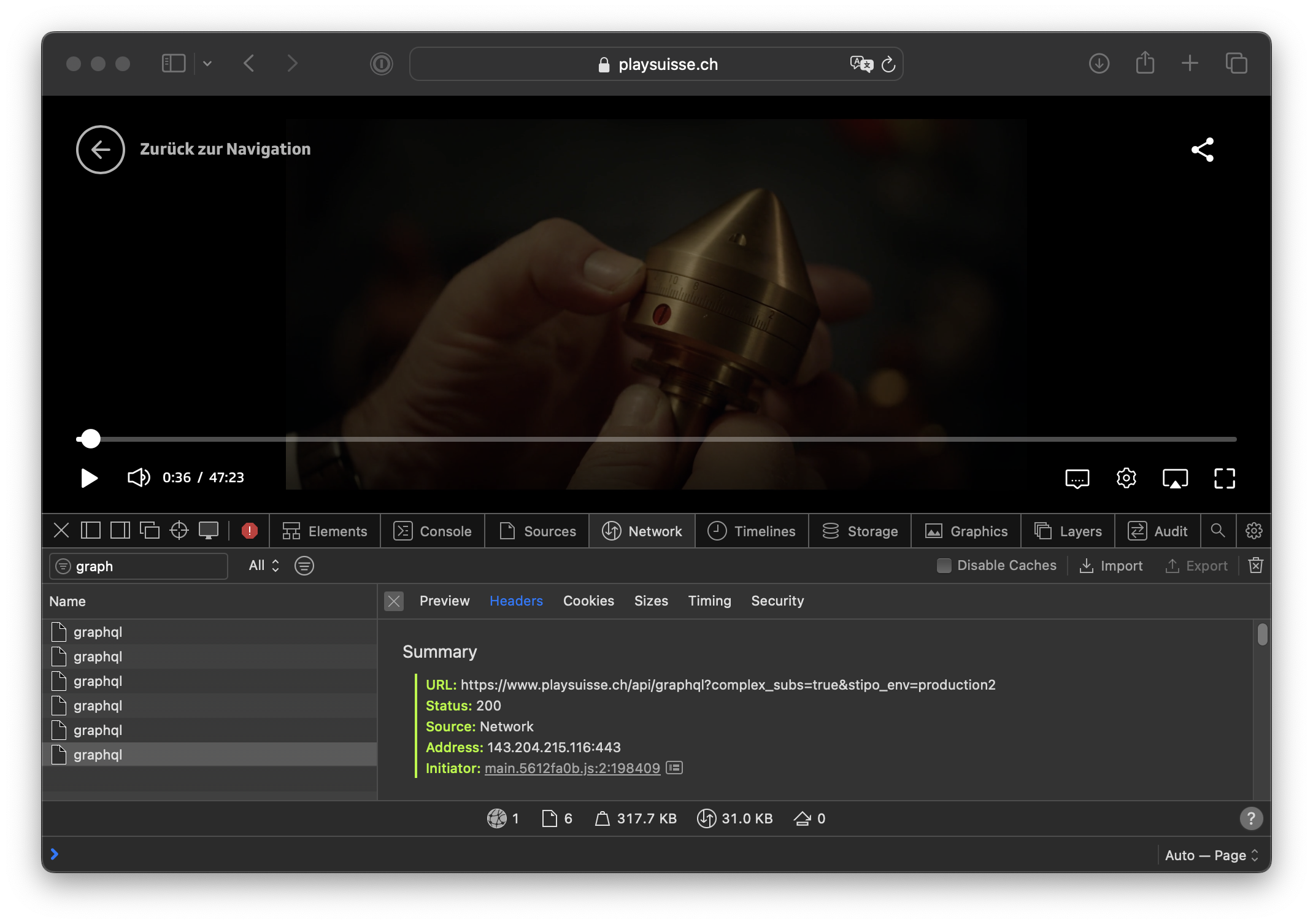
Fixing the video download
So the first change was moving the url to https://www.playsuisse.ch/api/graphql. Unfortunately this was where the bigger issues started:
python3 -m yt_dlp "https://www.playsuisse.ch/watch/2489617?episodeId=2498821&locale=de"
[PlaySuisse] Extracting URL: https://www.playsuisse.ch/watch/2489617?episodeId=2498821&locale=de
[PlaySuisse] 2498821: Downloading JSON metadata
[PlaySuisse] 2498821: Downloading m3u8 information
WARNING: [PlaySuisse] Failed to download m3u8 information: HTTP Error 400: Bad Request
ERROR: [PlaySuisse] 2498821: No video formats found!; please report this issue on  https://github.com/yt-dlp/yt-dlp/issues?q= , filling out the appropriate issue template. Confirm you are on the latest version using  yt-dlp -U
Clearly something else is going wrong. 400 Bad Requests means we called something at the server in a way it didn’t expect us to. Not having a clue what this might be caused on, I checked for any existing issues on Github and got lucky:
Bug:
![[PlaySuisse] Failed to download m3u8 information: HTTP Error 400: Bad Request](/posts/2024-01-playsuisse/7974_5249212696497893988.png)
Skimming the issue it became pretty clear what’s going on: Besides changing the host name, Play Suisse now also requires logging in as a user to access the video streams. While yt-dlp supports user logins, the extractor for Play Suisse does not have this implemented.
The issue thankfully already contains quite some details, most importantly, where this login is coming from and what the error is:
the m3u8 URL giving the error 400 response is: https://playsuisse.ch/api/playback?asset_id=2254297&stipo_env=production&language=de if opened in browser, you can see its error message is id_token not found which suggests they have added some sort of security token that the extractor is missing
and
From what I’ve been able to see with the developer tools, the URL for the m3u8 has now two tokens id_token and userinfo_token. In a private navigation window from a browser where I never logged in the PlaySuisse website, I’ve been able to download the m3u8 file using only the id_token. Alas, I haven’t been able to pinpoint the source for this value while browsing the website.
And people also figured out that this ID is stored in the browser’s local storage:
And it is then stored in Local Storage under the
persist:root key:
So at this point, it was quite obv. what to try next. What if we just get the token_id from an existing session (extracted from the developer tools in the browser) and hardcode the token_id in the python source code to see if this works?
This was easy to check by adding the token in the relevant section in yt_dlp/extractor/playsuisse.py, by changing the following code
            f, subs = self._extract_m3u8_formats_and_subtitles(
                media['url'], media_data['id'], 'mp4', m3u8_id='HLS', fatal=False)
and adding the following line above to change the media url:
            media['url'] = media['url'] + "&id_token=<token copy pasted from localstorage>"
           f, subs = self._extract_m3u8_formats_and_subtitles(
                media['url'], media_data['id'], 'mp4', m3u8_id='HLS', fatal=False)
and this was when it finally worked, I could download the video!
Figuring out how to get the token ID
Now for this to work longer than once (the token will expire), we need to automate fetching the tokens instead of pasting them from the browser.
The bug report hinted that the tokens are created during login. That sounded annoying to automate, but it turned out to be straightforward once I traced the web flow with developer tools and then replayed it with curl.
What the browser does:
- The login page generates a
StatePropertiesblob and a CSRF token. Both are passed along with your credentials. - After a successful POST, the page returns an
id_token(JWT) anduserinfo_token. These are stored in Local Storage under thepersist:rootkey. - Subsequent API calls add
id_tokento the HLS playback URL (the missing piece in yt-dlp), anduserinfo_tokenis used for profile requests.
Replaying with curl to confirm:
- The credentials are sent as regular form fields—no obfuscation.
- You must keep three things from the initial login page: cookies,
StateProperties, and theX-CSRF-TOKENheader. Strip anything else and the request still works. - Once the POST succeeds, the response contains the tokens; you can extract
id_tokenand feed it back into the playback URL. With that, the HLS manifests download fine.
I wrapped this logic in the extractor so yt-dlp can log in, pull the tokens, and append id_token automatically to the playback URL.
The fix landed here:
![[extractor/playsuisse] fix #7974 with login](/posts/2024-01-playsuisse/9077_5980360858156930288.png)
Postscript
Playsuisse has a few weird formats - The quality IDs for the video aren’t standardized and the audio track is somewhat random (as it typically has 3+ language tracks, the default rarely makes sense). Eventually I had success backing up the show I wanted with following command:
python3 -m yt_dlp "https://www.playsuisse.ch/detail/2489617?locale=de" \
--username="<email>" --password="<password>"  \
-f 'bestvideo+HLS-audio0-Deutsch' --embed-subs --sub-lang "en" \
-o "Davos.1917.S01E0%(playlist_index)s.%(title)s.%(ext)s"